Rebuilding Dynamic Mockups
- Timeline
- Apr – Oct 2026
- Shipped
- v2 for every user on Fri 19 Jun 2026; the new navigation in September
- Team
- Everyone, from engineering (front end and back end) to business, go-to-market and sales.
In v1 the menu had twelve items in four groups named after our modules: Discover, MockAnything AI, Blanks and Layouts without a heading; My Templates, My Assets and Adobe Photoshop under Library; Shopify, Etsy and Wordpress under Shops; Embed Mockup Editor and API Integration under Developer. In v2 each has one home named after the job: Home holds Discover, MockAnything AI and Blanks; Library holds Templates, Artworks and Photoshop files; Studio holds Layouts and the new Lookbooks and Stitch; Automate holds the API, the embedded editor and the apps.
01The app I inherited
By April, the product had outgrown its shape.
It was built on what Photoshop dictated, and every new feature got parked wherever there was room. You'd go somewhere and still not know where you were.
Read whyFold it away
Before AI, a PSD file was the finished mockup, and the whole app was a way to put artwork into it. I don't think that was wrong. At that moment nobody had the information we have today.
Collections couldn't be folders. And we shipped features constantly.
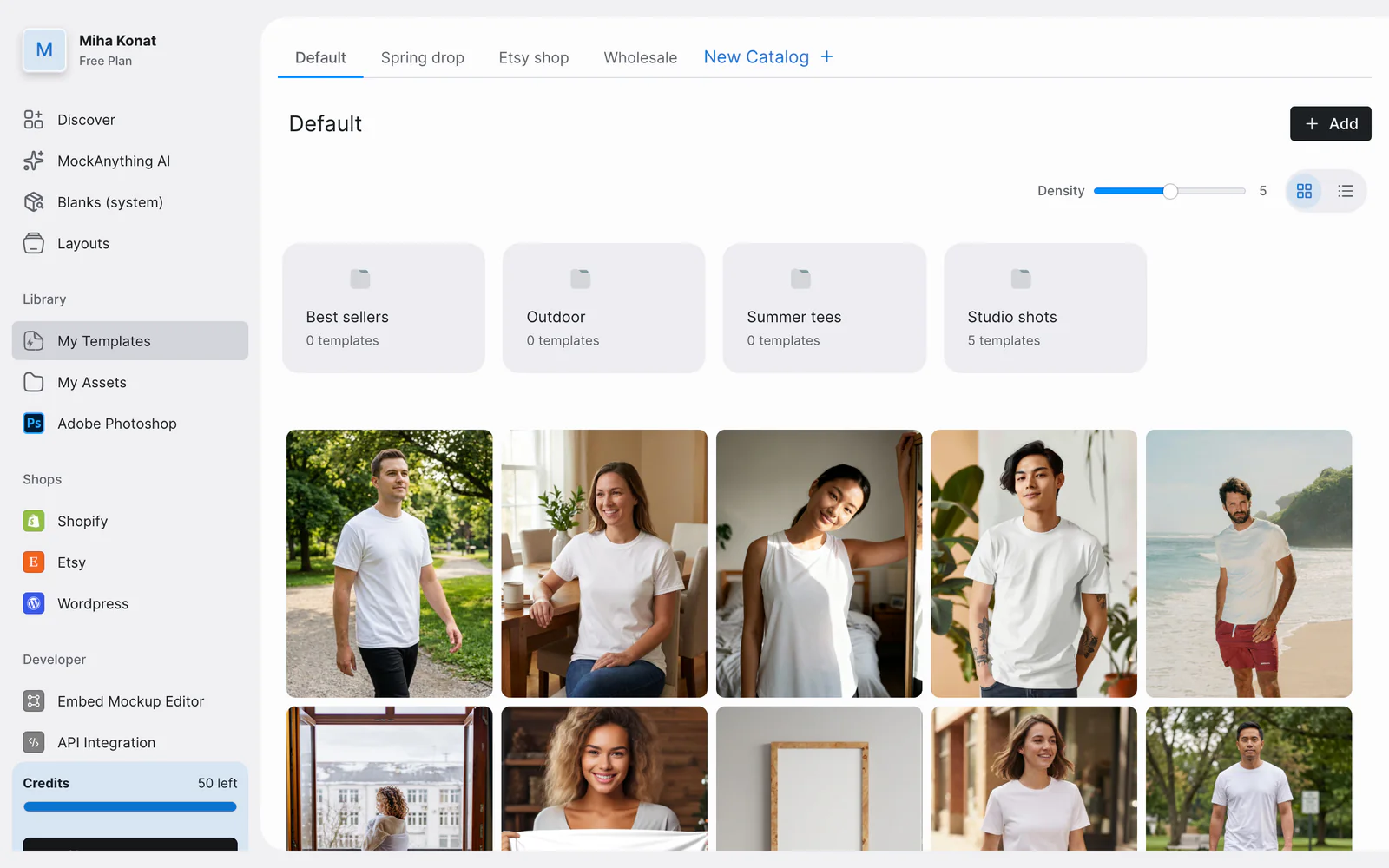
- Twelve items in four groups, named after our own modules
- Catalogs as tabs: a second navigation inside the first
- Collections drawn as folders, so people used them as folders
02The structure I saw
Work backwards from the jobs people come to do.
In May, with our product and engineering leads, I mapped the journey in four steps. The structure that fell out of it was simpler than the app it replaced.
Read whyFold it away
In the Library, everything that's yours is framed the same way, so you always know where you are. Two of the changes were refactoring. The third, projects, was a new thing altogether.
The journey, mapped in May
- Get started
- Generate
- Publish
- Keep it organised
The structure it gave, in June
Home
Where every session starts.
Discover
Browse what's ready-made.
Library
Keep what's yours.
- Templates
- in catalogs and collections
- Artworks
- in folders
- Photoshop files
- in a table
03Parity first
Ship the new frame first. Take nothing away.
The first plan was the whole vision, chat-first and built around projects. We shipped sooner instead, with everything people knew still in it.
Read whyFold it away
Its architecture already existed. Then we decided to simplify and ship sooner, for an easier transition. The future didn't get deleted, it got gated.
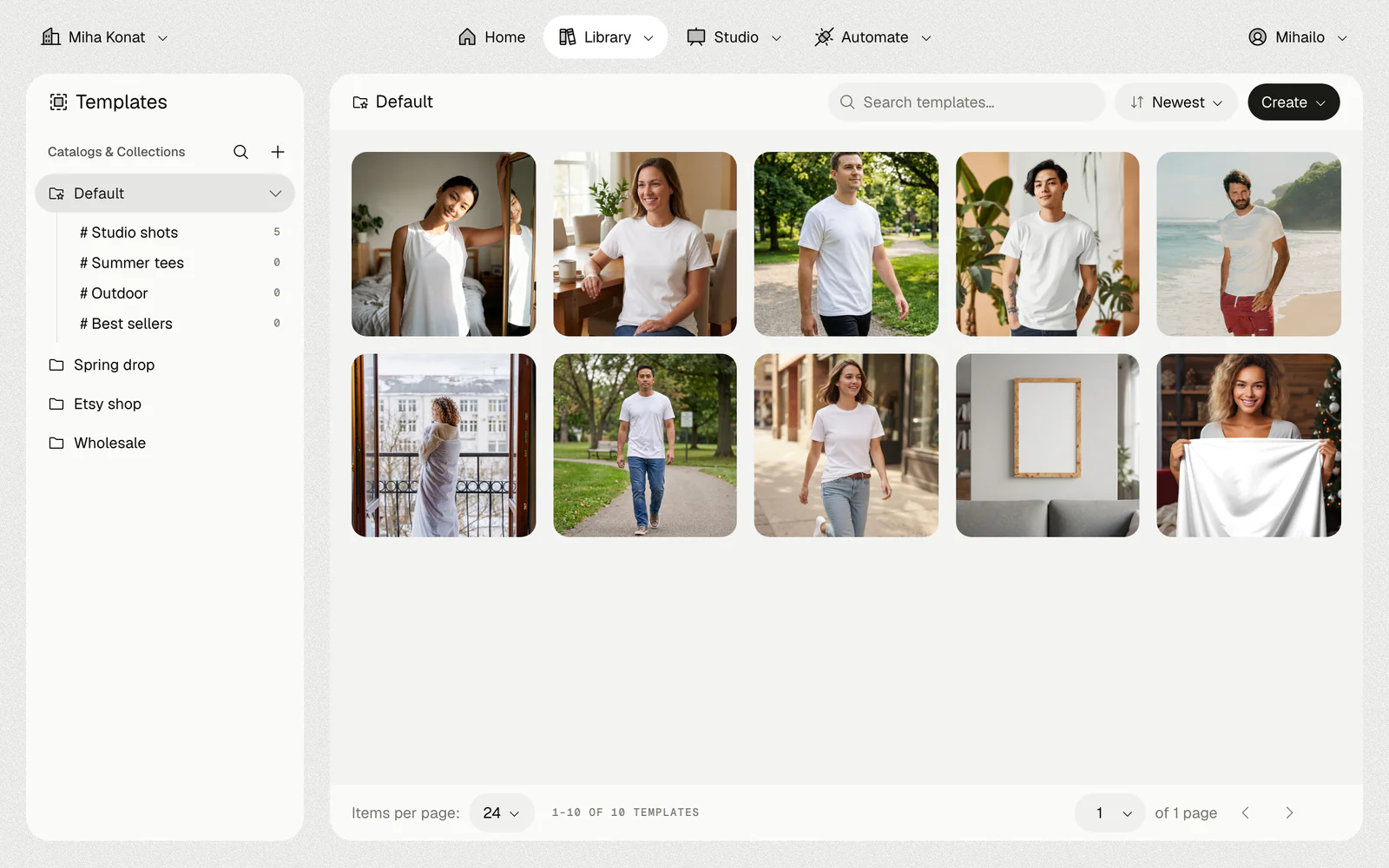
- Catalogs and collections in one tree, collections marked # as the labels they are
- Search, sort and Create in the same place in every library view
- The same templates as in v1
Rebuilt in v2
- The shell and the navigation
- Home, with the composer
- Discover
- The Library: templates, artworks, Photoshop files
- Settings, billing, API and embed
Kept, inside the new frame
- The editors people already knew
- Creating and editing, handed to them from v2
Gated for later
- Projects, the one new entity
- The chat-first composer
- Its onboarding and memory
Gate, not delete: the full version stays in the codebase behind a switch.
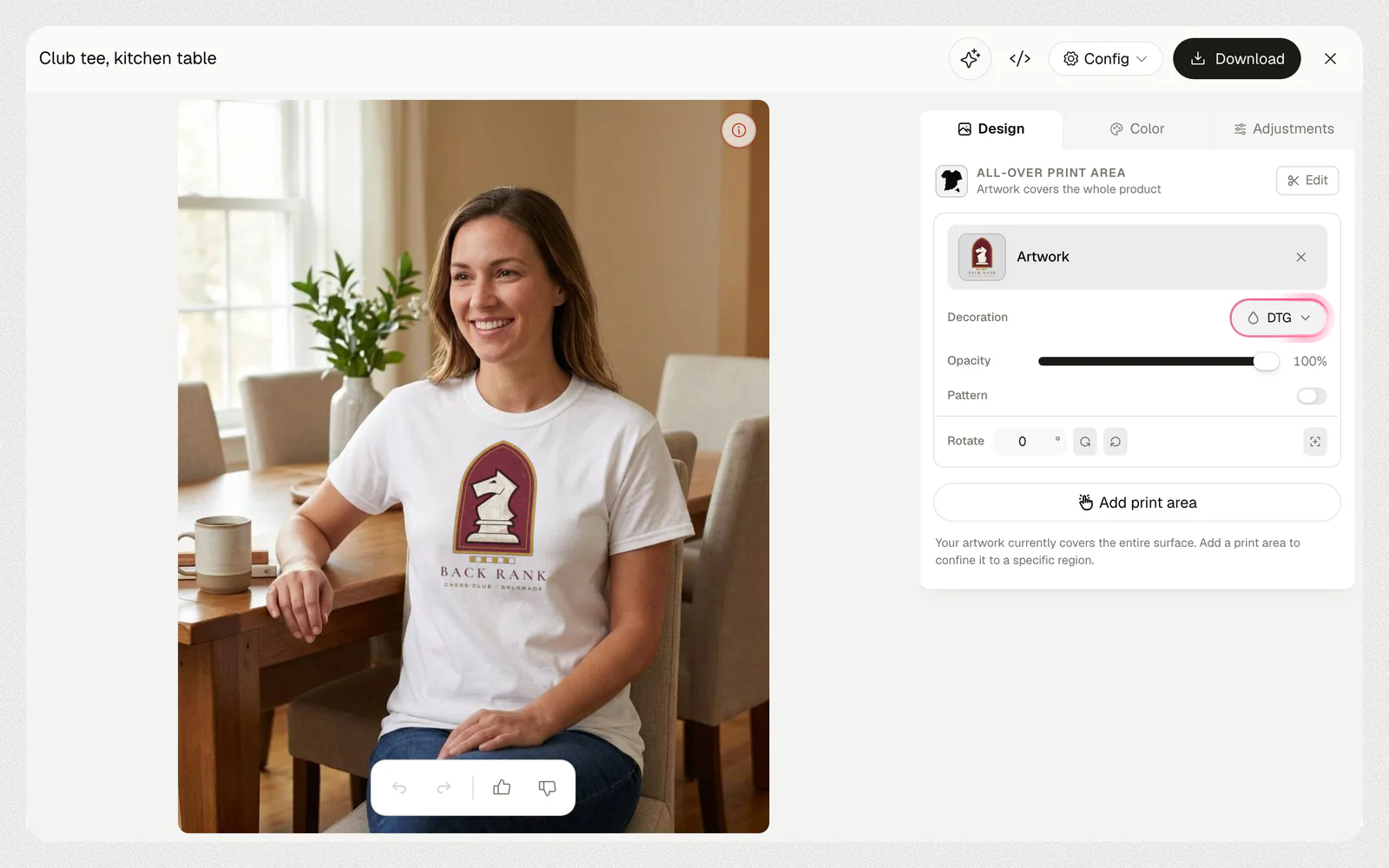
- The editor's flow, kept from v1
04One navigation, around the journey
Every feature gets exactly one home.
After launch, new things piled into the top bar overnight, and people lost their way back to Home. In September I rebuilt it around the journey, every item named after the job.
Read whyFold it away
After launch the app kept growing, and the top bar couldn't take what was coming next.
Studio is where output happens: it should feel like walking into a studio and arranging the images you have.
The rule for whatever ships next: new features land in an obvious place instead of degrading the navigation further.
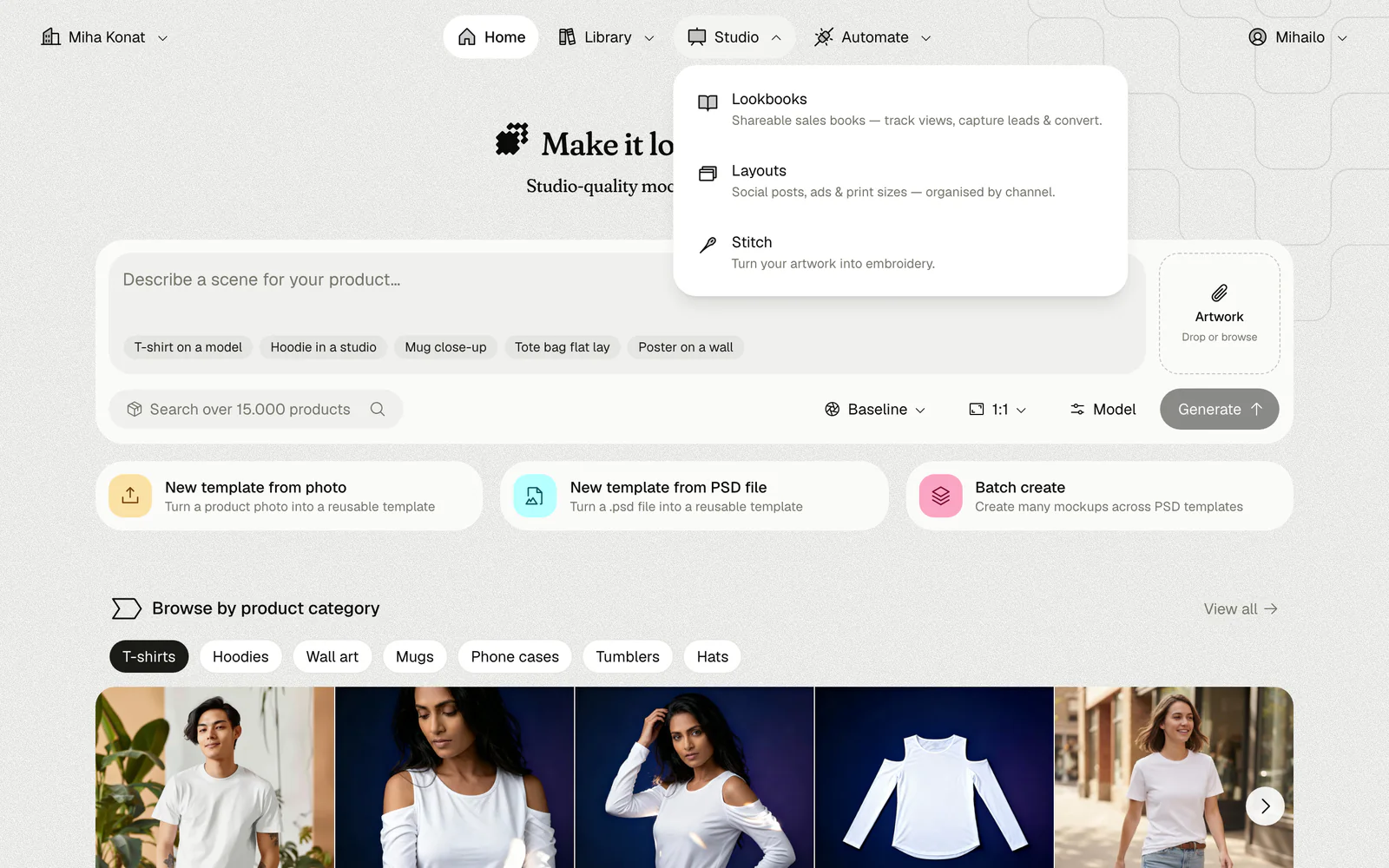
- Home, first, so the way back is always there
- Library, as it shipped in June
- Studio: everything about output
- Automate: the API, webhooks, the embedded editor and apps
Jun
v2 launches
- Home
- Discover
- Library
The structure from May, as it shipped.
Sep
Studio, Automate and Apps arrive
- Home
- Discover
- Library
- Studionew
- Automatenew
- Appsnew
Studio holds lookbooks, layouts and Stitch.
Oct
Two items fold in
- Home
- Discover, now on Home
- Library
- Studio
- Automate
- Apps, now in Automate
The apps live in Automate.
05A system the agents follow
The skill is the system.
Early on I wrote down what a design system means when the ones building with it are AI agents: a skill, the tokens, one file per component, the patterns and the product's context.
Read whyFold it away
The base is shadcn/ui. On top sit the rules the product taught me.
- One concept, one icon
- Close is an x, loading is a spinner, anything AI is a sparkle.
- A category is not a filter
- Categories organise what's there; chips signal a filter on it.
- Each control has one job
- A segmented control changes the view, never the content. Tabs are secondary navigation.
- Colour that means something
- Brand colours only where they carry meaning: focus, new and AI, quantities.
- Separate by shade
- Surfaces and elevation come from shade, not outlines or shadows.
- When nothing fits, ask
- The agent stops and offers options instead of inventing a component.
How the rules stay sharp
- The rule, in the skill
- The agent builds
- I review it
- The rule gets sharper
- and round again.
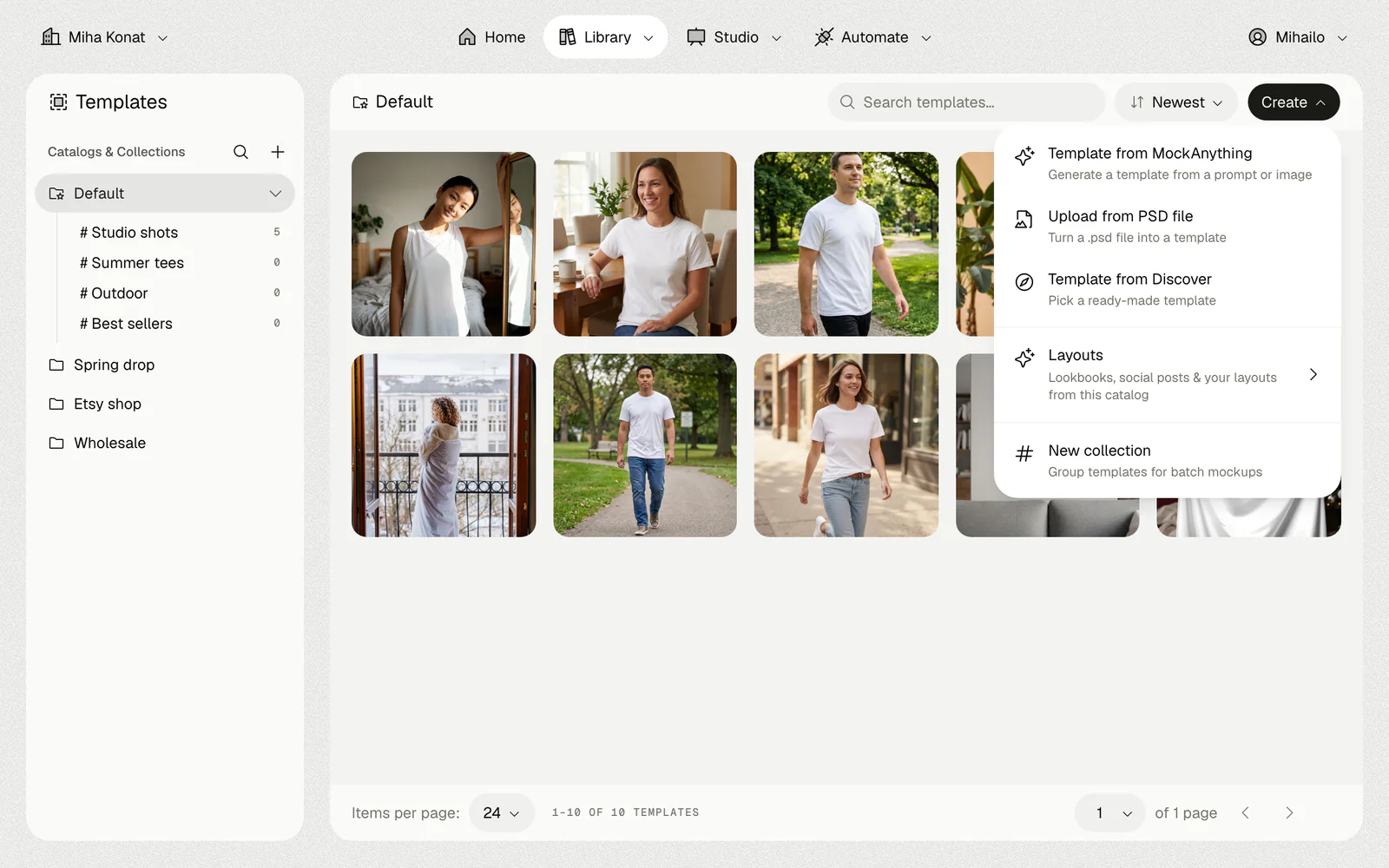
- MockAnything and Layouts are both AI, so both carry the sparkle
- Every option says what it does, in a line under its name
- Collections carry their # here too
06Discover on Home
Browsing is how a lot of sessions start, so it starts on Home.
In v2 Discover was its own tab. It moved onto Home, under the composer: generate something new, or start from something ready-made, on the same screen.
Read whyFold it away
Under parity we didn't have time to rethink Discover. People went looking for templates before they'd even signed in. So it came to Home without its frame, and its tab left the top bar.
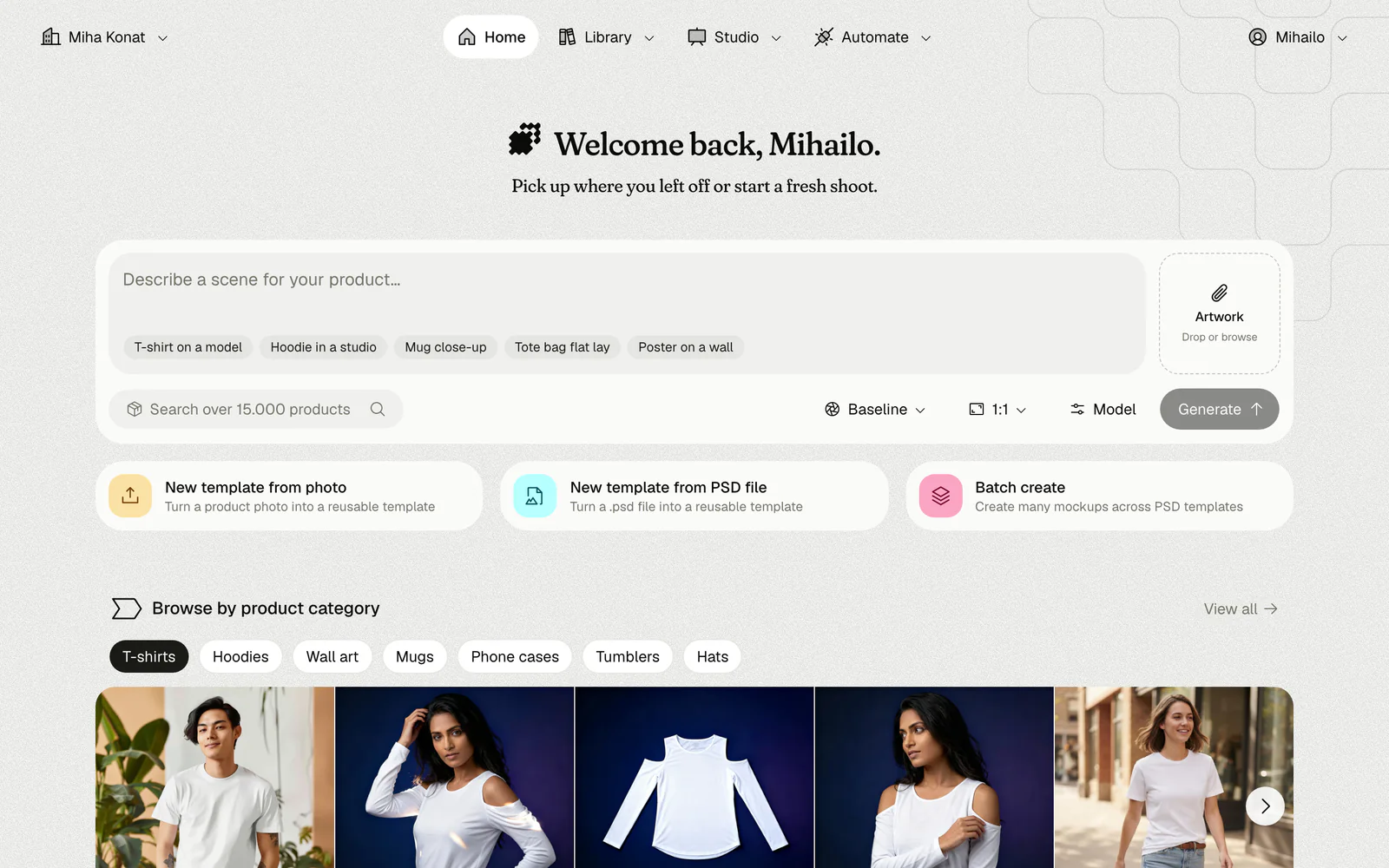
- The composer: describe a scene and generate
- Three ways to start from what you already have
- Discover: browse by product
07Shipping it myself
Nothing lost between the design and the build.
I met git and Claude Code in April. By the end of May the base of v2 existed.
Read whyFold it away
I talked it through with everyone, for feedback from every side. A front-end engineer set v2 up in the project and wired the APIs with me. I wrote most of the front end: about two thirds of the interface, rewritten in roughly three weeks, with 37 new components.
Three documents in
The outline
The terminology, the hierarchy and the mental models.
The execution plan
The build, step by step.
The strategy
Where the product is going.
Then, one step at a time
01
One step of the plan
On real data and the real APIs, sharing its services with v1.
02
The agents build it
Following the outline and the system's rules.
03
I check it
The screen with my own eyes, and the tests, as a human double-check.
Then the next step.
08What I'd do differently
One thing I'd do sooner, two I'd do again.
Four months after v2 went to everyone.
Discover, sooner
I'd bring it into the first version instead of leaving it for later.
Small steps, again
Branding, Home and the navigation were tempting to bundle into one release. Taking them one at a time was the right call.
Parity first, again
Everything we built after the switch shipped straight into the new app.
What I saw coming
The states nobody draws in the first mockup.
Selection that works everywhere
Templates, artworks and Discover items select the same way, with one action bar for whatever is selected.
Scroll you can see
A row that scrolls shows arrows, so nothing hides past the edge. Visibility of system status, recognition rather than recall.
Empty is a state too
Every library view designed empty as well as full, with the next step on it.
Light and dark from the first token
Both themes checked on every screen as it was built, not themed at the end.
Phone width and the keyboard
A pass over every v2 screen at phone width, focus that follows how you navigate, and motion that respects reduced motion.